[1]:
# Install hypertools (run this first on Colab)
import importlib.util
if importlib.util.find_spec('hypertools') is None:
    %pip install -q "hypertools[interactive]"

# This tutorial also uses convokit + sentence-transformers (not HyperTools
# deps); self-install them so a top-to-bottom run works headlessly too.
if importlib.util.find_spec('convokit') is None:
    %pip install -q convokit
if importlib.util.find_spec('sentence_transformers') is None:
    %pip install -q sentence-transformers
Visualizing the shape of a conversation
Conversations move. A discussion drifts from topic to topic, doubles back on itself, and takes sharp turns when a new speaker chimes in. In this tutorial we’ll make that motion visible: we’ll take a real Reddit conversation, embed a sliding window of sentences within each utterance using a sentence-embedding model, and use HyperTools to draw the conversation as a sequence of utterance trajectories through meaning space – colored by who is speaking, and animated so that each utterance draws itself into the scene, one at a time.
This tutorial uses two extra libraries that are not installed with HyperTools. You can install them by running:
%pip install convokit sentence-transformers
(The animation step at the end also uses ffmpeg to convert the exported movie into a GIF.)
[2]:
%matplotlib inline
import os
os.environ['HF_HUB_DISABLE_PROGRESS_BARS'] = '1'
os.environ['HF_HUB_VERBOSITY'] = 'error'
os.environ['TOKENIZERS_PARALLELISM'] = 'false'

import warnings
warnings.filterwarnings('ignore')

import random
import re

import numpy as np
import seaborn as sns
import matplotlib.pyplot as plt

from convokit import Corpus, download
from sentence_transformers import SentenceTransformer

import hypertools as hyp
Downloading a corpus of Reddit conversations
ConvoKit provides easy access to dozens of conversational datasets. We’ll use the reddit-corpus-small corpus, which contains posts and comment threads sampled from 100 highly active subreddits.
[3]:
corpus = Corpus(filename=download('reddit-corpus-small'))
corpus.meta
Dataset already exists at /Users/jmanning/.convokit/saved-corpora/reddit-corpus-small
[3]:
ConvoKitMeta({'subreddit': 'reddit-corpus-small', 'num_posts': 8286, 'num_comments': 288846, 'num_user': 119889})
Choosing a conversation
We’ll pick a conversation at random (seeded for reproducibility) from among the conversations with at least 10 “usable” utterances – i.e., utterances whose text hasn’t been deleted or removed. Since we’re about to trace how individual utterances move through meaning space, we also require a conversation where people actually say something: most utterances should contain several sentences (at least 60% with 2+ sentence windows), with at most 40 utterances so the animation stays legible. Utterances are taken in chronological order, treating the comment thread as one unfolding conversation.
[4]:
MIN_UTTERANCES = 10
MAX_UTTERANCES = 40
SENTENCE_WINDOW = 3

def usable_utterances(conversation):
    """Chronologically-ordered utterances with non-empty, non-deleted text."""
    utterances = conversation.get_chronological_utterance_list()
    return [u for u in utterances
            if u.text and u.text.strip()
            and u.text.strip() not in ('[deleted]', '[removed]')]

def split_sentences(text):
    """Simple sentence splitter: break on ., !, ? followed by whitespace."""
    sentences = [s.strip() for s in re.split(r'(?<=[.!?])\s+', text)]
    return [s for s in sentences if s]

def count_windows(text):
    sentences = split_sentences(text)
    return max(1, len(sentences) - SENTENCE_WINDOW + 1) \
        if len(sentences) >= SENTENCE_WINDOW else 1

def substantial(conversation):
    utterances = usable_utterances(conversation)
    if not MIN_UTTERANCES <= len(utterances) <= MAX_UTTERANCES:
        return False
    if len(set(u.speaker.id for u in utterances)) < 2:
        return False
    multi = sum(1 for u in utterances if count_windows(u.text.strip()) >= 2)
    return multi / len(utterances) >= 0.6

candidates = [c for c in corpus.iter_conversations() if substantial(c)]
print(f'qualifying conversations: {len(candidates)}')

random.seed(25)
conversation = random.choice(candidates)
utterances = usable_utterances(conversation)
speakers = [u.speaker.id for u in utterances]
texts = [u.text.strip() for u in utterances]

print(f"\ntitle: {conversation.meta['title']}")
print(f"subreddit: r/{conversation.meta['subreddit']}")
print(f'utterances: {len(utterances)}; speakers: {len(set(speakers))}')
print('\nopening exchange:')
for u in utterances[:4]:
    print(f'  [{u.speaker.id}] {u.text.strip()[:90]}...')
qualifying conversations: 244

title: Why don’t more cameras have dual native iso? Also, why couldn’t we have a sensor that captures images using multiple ISOs at once?
subreddit: r/photography
utterances: 10; speakers: 5

opening exchange:
  [CCtenor] We have all seen how good recent sensors are, capable of capturing almost 15 stops of dyna...
  [implode573] ISO doesn't work how you think it does. That "native ISO" you're looking for is called SNR...
  [CCtenor] Yes, and the “native iso” is the setting at which a camera is not applying any gain to the...
  [CCtenor] > The SNR is there because heat and transferring. Many camera systems now work around t...
Embedding each utterance with a sliding sentence window
To turn each utterance into its own mini-trajectory, we slide a window of 3 consecutive sentences along the text of that utterance, concatenate the sentences inside each window, and embed each window with `all-MiniLM-L6-v2 <https://huggingface.co/sentence-transformers/all-MiniLM-L6-v2>`__, a compact sentence-BERT model. Because the windows never cross utterance boundaries, every utterance becomes a truly separate trajectory: utterances never share points.
Utterances with fewer than 3 sentences get a single window containing the whole utterance; single-window utterances have their embedding row duplicated so that every utterance array has at least 2 rows. (A duplicated point has zero length as a line, so below we plot with the '.-' format – dots at every embedding window plus connecting lines – which keeps single-window utterances visible as single dots.)
[5]:
utterance_windows = []   # list (per utterance) of lists of window texts
for text in texts:
    sentences = split_sentences(text)
    if len(sentences) < SENTENCE_WINDOW:
        windows = [text]  # one window: the whole utterance
    else:
        windows = [' '.join(sentences[i:i + SENTENCE_WINDOW])
                   for i in range(len(sentences) - SENTENCE_WINDOW + 1)]
    utterance_windows.append(windows)

model = SentenceTransformer('sentence-transformers/all-MiniLM-L6-v2')
flat_windows = [w for windows in utterance_windows for w in windows]
flat_embeddings = model.encode(flat_windows, show_progress_bar=False)

# carve the flat embedding matrix back into one array per utterance,
# duplicating the row for single-window utterances so each array has >= 2 rows
utterance_arrays, start = [], 0
for windows in utterance_windows:
    emb = flat_embeddings[start:start + len(windows)]
    start += len(windows)
    if emb.shape[0] == 1:
        emb = np.vstack([emb, emb])
    utterance_arrays.append(emb)

print(f'{len(utterance_arrays)} utterance trajectories; '
      f'windows per utterance: {[len(w) for w in utterance_windows]}')
10 utterance trajectories; windows per utterance: [31, 1, 1, 13, 11, 3, 6, 1, 17, 12]
One color per speaker
Every speaker gets one fixed color, and every utterance is drawn in its speaker’s color – so in a two-person conversation exactly two colors alternate, and in this thread the colors repeat whenever a speaker takes another turn.
[6]:
speaker_names = sorted(set(speakers), key=speakers.index)
palette = sns.color_palette('hls', len(speaker_names))
utterance_colors = [palette[speaker_names.index(s)] for s in speakers]

print(f'{len(speaker_names)} speakers -> {len(set(map(tuple, utterance_colors)))} colors '
      f'across {len(utterance_colors)} utterances')
5 speakers -> 5 colors across 10 utterances
The static shape of the conversation
HyperTools reduces the 384-dimensional window embeddings to 3D and draws each utterance as its own stroke, colored by its speaker. The utterances are not connected to each other – each one is a separate trajectory through meaning space.
[7]:
fig = hyp.plot(utterance_arrays, '.-', color=utterance_colors, linewidth=2,
               markersize=5, show=False,
               title=f"the shape of a conversation (r/{conversation.meta['subreddit']})")

handles = [plt.Line2D([0], [0], color=palette[i], lw=2)
           for i in range(len(speaker_names))]
fig.axes[0].legend(handles, speaker_names, loc='upper left',
              bbox_to_anchor=(1.02, 0.95), fontsize=7)
fig
[7]:
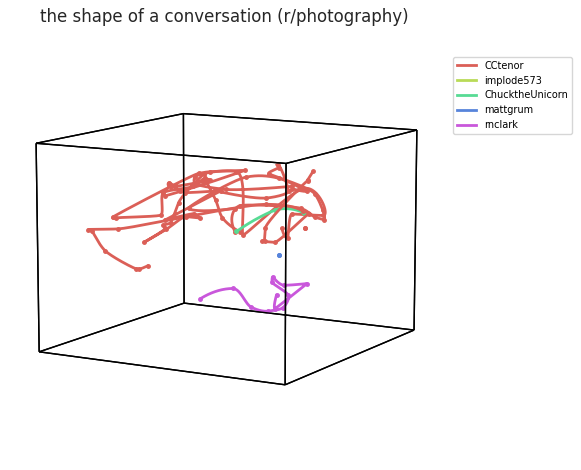
Each color is one speaker; each stroke is one utterance (utterances with a single embedding window appear as a single dot). Longer, winding strokes are utterances that themselves wander across several ideas; compact strokes are short, single-thought comments.
Watching the conversation unfold
Now for the fun part. HyperTools’ animate='serial' mode plays the datasets back in list order: the first utterance grows point-by-point into place; then the second grows while the first stays fixed; and so on until the whole conversation has assembled itself – all while the camera slowly makes one orbit of the scene over the 30-second animation. Utterances are never connected to each other; each new stroke simply appears where the conversation went next.
We’ll save the animation as an MP4 (compact and fast to render), then use ffmpeg to convert it into a GIF for inline display.
[8]:
fig, ani = hyp.plot(utterance_arrays, '.-', color=utterance_colors,
               markersize=5,
               animate='serial', duration=30, rotations=1, frame_rate=30,
               zoom=1.5, linewidth=2,
               save_path='conversation_serial.mp4', show=False)

print(f"mp4: {os.path.getsize('conversation_serial.mp4')/1e6:0.1f} MB")
mp4: 7.6 MB
[9]:
import shutil
import subprocess

if shutil.which('ffmpeg'):
    filters = ('fps=30,scale=420:-1:flags=lanczos,split [a][b]; '
               '[a] palettegen=max_colors=64 [p]; '
               '[b][p] paletteuse=dither=bayer:bayer_scale=3')
    subprocess.run(['ffmpeg', '-y', '-i', 'conversation_serial.mp4',
                    '-vf', filters, 'conversation_serial.gif'],
                   check=True, capture_output=True)
    os.remove('conversation_serial.mp4')
    print(f"gif: {os.path.getsize('conversation_serial.gif')/1e6:0.1f} MB")
else:
    print('ffmpeg not found -- skipping GIF conversion; the animation '
          'is saved as conversation_serial.mp4 instead.')
gif: 9.5 MB
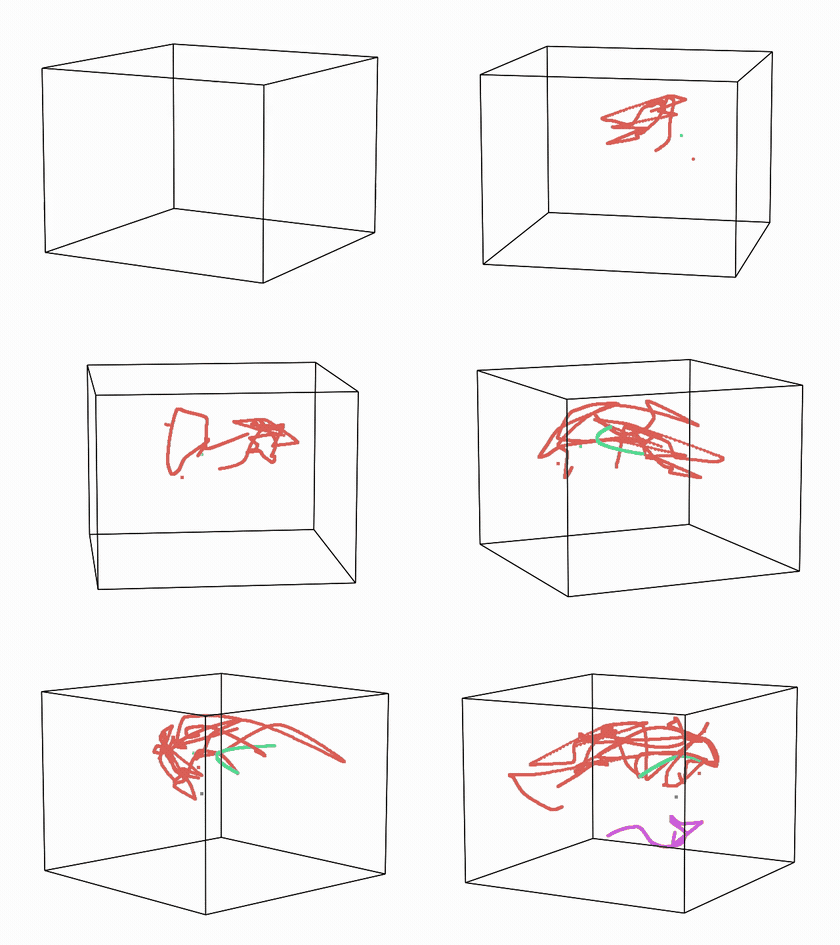
(The animation above is loaded from ``conversation_serial.gif``, written by the cell above; if your environment does not render it inline, open the file directly.)
Next steps
Try a longer conversation (raise MIN_UTTERANCES), a different sentence window length, or another ConvoKit corpus entirely (movie-corpus, supreme-court-arguments, …). You could also compare several conversations at once by passing multiple trajectories to hyp.plot, or use hyp.align to map different conversations into a shared space.