Note
Go to the end to download the full example code.
Surfaces around point clouds
 run this example as a notebook — or grab the .ipynb (also linked at the bottom of the page)
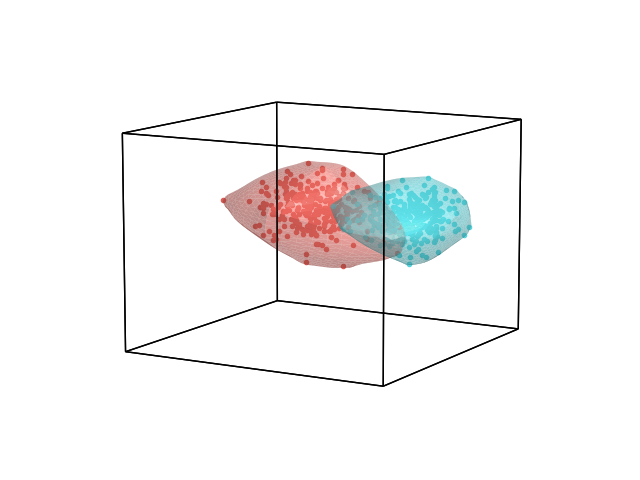
The surface kwarg overlays a smooth, lit surface over each dataset’s convex hull: a filled outline for 2D data, or a shaded, Taubin-smoothed 3D “blob” for 3D data (GH #109). Pass surface=True for sensible defaults, or a dict to customize the alpha, color, lighting, and amount of smoothing.
# Code source: Contextual Dynamics Laboratory
# License: MIT

import numpy as np

import hypertools as hyp

rng = np.random.default_rng(0)

# two blobby 3D point clouds
blob_a = rng.standard_normal((300, 3)) * [1.0, 0.6, 0.8]
blob_b = rng.standard_normal((300, 3)) * [0.7, 1.0, 0.6] + [3.5, 0, 0]

# default surfaces: hyp.plot infers sensible alpha/lighting/smoothing
hyp.plot([blob_a, blob_b], '.', surface=True)
/home/docs/checkouts/readthedocs.org/user_builds/hypertools/checkouts/latest/hypertools/plot/backend.py:1353: UserWarning: Failed to switch to any interactive backend (TkAgg, QtAgg, Qt5Agg, Qt4Agg, GTK4Agg, GTK3Agg, WXAgg). Falling back to 'Agg'.
  warnings.warn(BACKEND_WARNING)
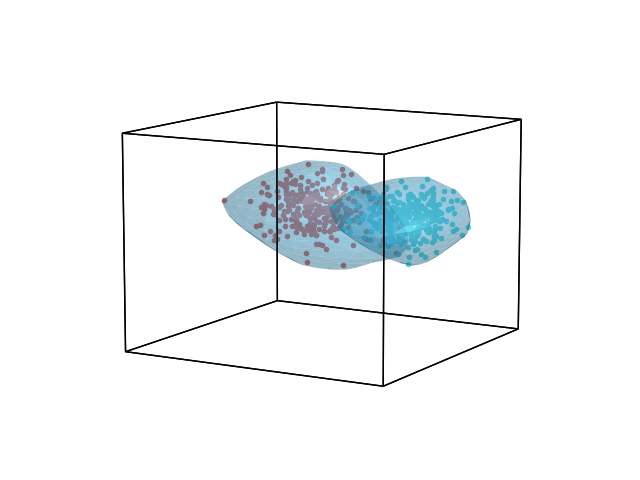
The dict API gives per-call control over the surface’s look: alpha (transparency), color (overrides the dataset’s own drawn color), lighting (a dict of Blinn-Phong shading terms), and smoothing (rounds of Taubin mesh smoothing – higher looks glossier but is slower to compute).
/home/docs/checkouts/readthedocs.org/user_builds/hypertools/checkouts/latest/hypertools/plot/backend.py:1353: UserWarning: Failed to switch to any interactive backend (TkAgg, QtAgg, Qt5Agg, Qt4Agg, GTK4Agg, GTK3Agg, WXAgg). Falling back to 'Agg'.
  warnings.warn(BACKEND_WARNING)
Total running time of the script: (0 minutes 0.459 seconds)