[1]:
# Install hypertools (run this first on Colab)
import importlib.util
if importlib.util.find_spec('hypertools') is None:
    %pip install -q "hypertools[interactive]"
Visualizing Hugging Face text embeddings
Modern language models turn text into high-dimensional embedding vectors – a perfect match for HyperTools! In this tutorial we’ll embed news headlines from a Hugging Face dataset using a small sentence-transformers model, and then use HyperTools to explore the embedding space.
This tutorial uses two extra libraries that are not installed with HyperTools. You can install them by running:
%pip install sentence-transformers datasets
[2]:
%matplotlib inline
import os
os.environ['HF_HUB_DISABLE_PROGRESS_BARS'] = '1'
os.environ['HF_HUB_VERBOSITY'] = 'error'

import warnings
warnings.filterwarnings('ignore')

import numpy as np
import datasets
from datasets import load_dataset
from sentence_transformers import SentenceTransformer

import hypertools as hyp

datasets.disable_progress_bars()
Embedding news headlines
We’ll use a small sample (400 headlines) from the AG News dataset, which contains news headlines from four categories: World, Sports, Business, and Sci/Tech. To turn each headline into a vector we’ll use `all-MiniLM-L6-v2 <https://huggingface.co/sentence-transformers/all-MiniLM-L6-v2>`__, a compact sentence-embedding model that maps each document onto a 384-dimensional vector.
[3]:
dataset = load_dataset('fancyzhx/ag_news', split='train[:2000]')
dataset = dataset.shuffle(seed=42).select(range(400))  # a mixed 400-headline sample

label_names = dataset.features['label'].names
headlines = dataset['text']
categories = [label_names[i] for i in dataset['label']]
category_set = list(dict.fromkeys(categories))  # in order of first appearance

model = SentenceTransformer('sentence-transformers/all-MiniLM-L6-v2')
embeddings = model.encode(headlines, show_progress_bar=False)
embeddings.shape
[3]:
(400, 384)
Plotting the embedding space
Passing the category labels via the hue argument colors each headline by its news category (and passing the category names via legend labels the groups). HyperTools reduces the 384-dimensional embeddings to 3D (using incremental PCA by default) before plotting.
[4]:
fig = hyp.plot(embeddings, 'o', hue=categories, legend=category_set,
               title='AG News headlines (MiniLM embeddings)')
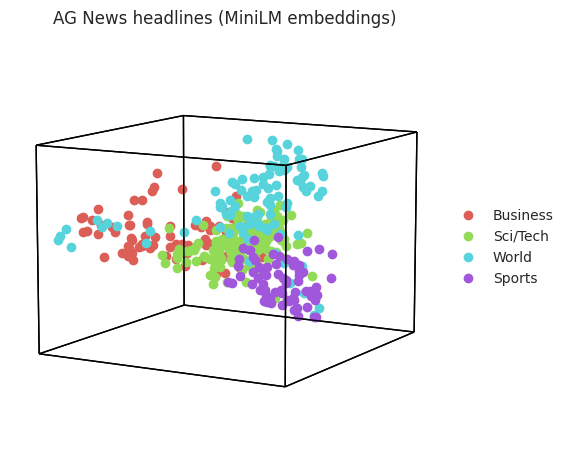
Even in three dimensions, headlines from the same category tend to occupy the same part of the embedding space.
Soft clustering with Gaussian mixture models
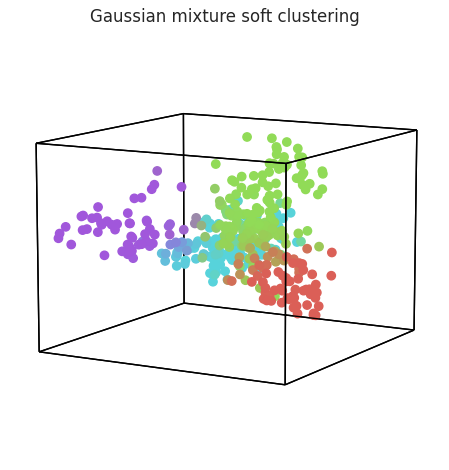
What if we didn’t know the category labels? We can discover structure directly from the embeddings. Setting cluster='GaussianMixture' fits a mixture model and colors each observation by its blend of cluster memberships – points that sit between clusters get intermediate colors, revealing the soft category boundaries.
[5]:
fig = hyp.plot(embeddings, 'o', cluster='GaussianMixture', n_clusters=4,
               title='Gaussian mixture soft clustering')
Nonlinear embeddings with UMAP
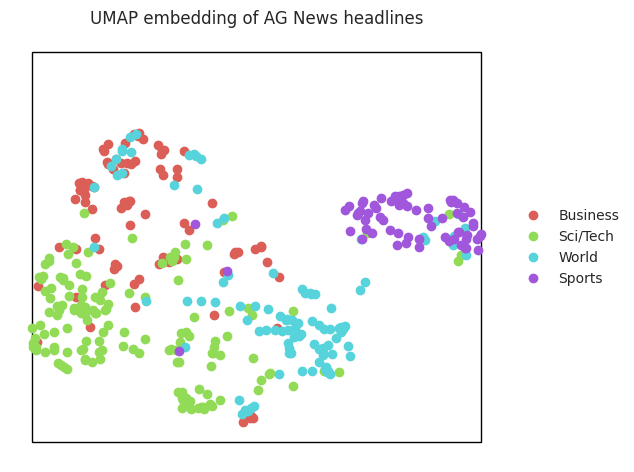
PCA is linear; nonlinear methods like UMAP can often do a better job of untangling text embeddings. Just pass reduce='UMAP':
[6]:
fig = hyp.plot(embeddings, 'o', reduce='UMAP', ndims=2,
               hue=categories, legend=category_set,
               title='UMAP embedding of AG News headlines')
Animated 3D visualization
Finally, HyperTools can animate the plot – animate='spin' slowly rotates the 3D scatter once around (over 30 seconds, at 30 frames per second) so we can inspect it from every angle. We export the animation as an MP4 (MP4, GIF, and animated SVG are all supported), then convert it to a GIF with ffmpeg for inline display:
[7]:
fig, ani = hyp.plot(embeddings, 'o', hue=categories, animate='spin',
               duration=30, rotations=1, frame_rate=30,
               save_path='hf_embeddings_spin.mp4', show=False)
[8]:
import os
import shutil
import subprocess

if shutil.which('ffmpeg'):
    filters = ('fps=30,scale=420:-1:flags=lanczos,split [a][b]; '
               '[a] palettegen=max_colors=64 [p]; '
               '[b][p] paletteuse=dither=bayer:bayer_scale=3')
    subprocess.run(['ffmpeg', '-y', '-i', 'hf_embeddings_spin.mp4',
                    '-vf', filters, 'hf_embeddings_spin.gif'],
                   check=True, capture_output=True)
    os.remove('hf_embeddings_spin.mp4')
    print(f"gif: {os.path.getsize('hf_embeddings_spin.gif')/1e6:0.1f} MB")
else:
    print('ffmpeg not found -- skipping GIF conversion; the animation '
          'is saved as hf_embeddings_spin.mp4 instead.')
gif: 11.0 MB
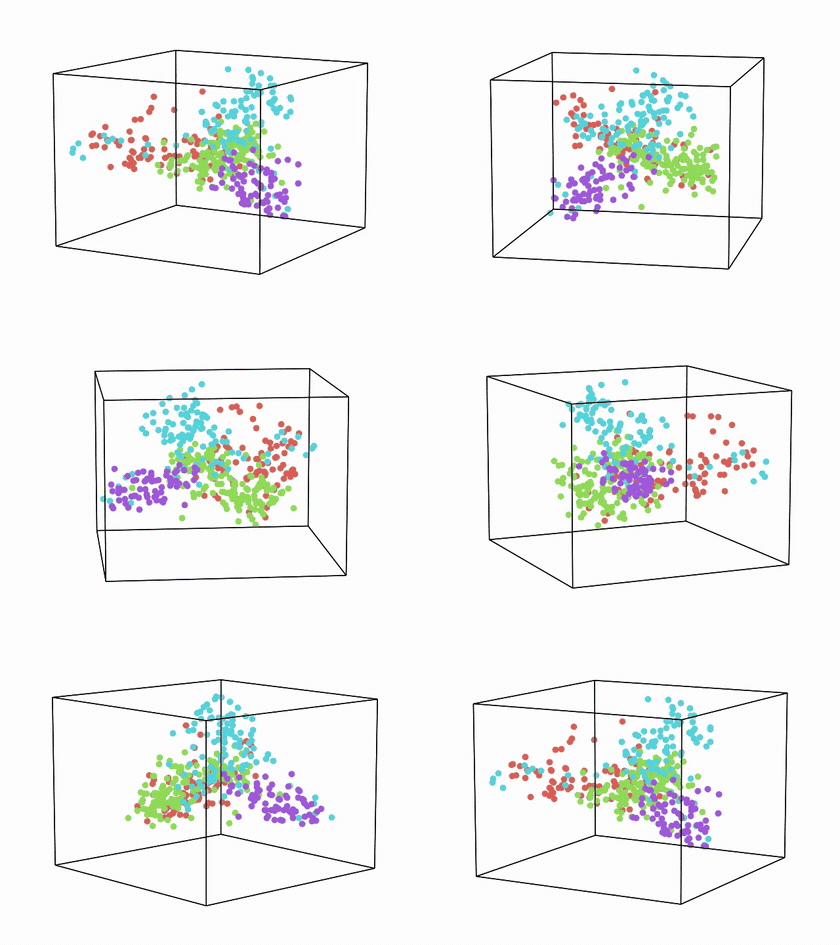
(The animation above is loaded from ``hf_embeddings_spin.gif``, written by the cell above; if your environment does not render it inline, open the file directly.)
Next steps
Try swapping in a different Hugging Face dataset or embedding model, aligning embeddings from two models with hyp.align, or exploring interactive 3D plots with backend='plotly'.